No scanner. And the form wants a PDF right now.
Photograph the document with your phone — get back an A4 PDF that passes wherever a scan is asked for.
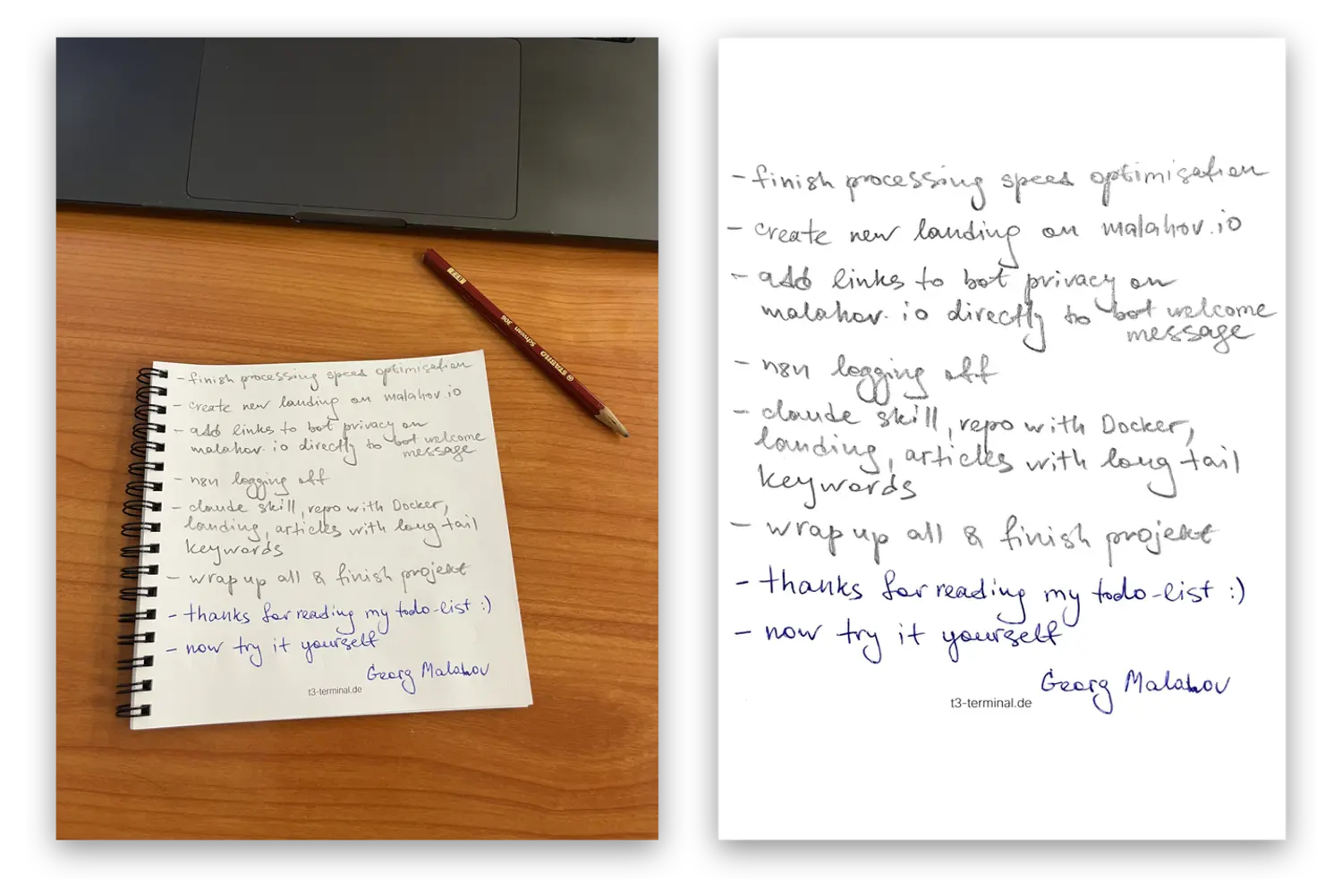
A photo of a document is not a scan.
The sheet is at an angle, half of it is in shadow, the paper is grey and the file is four megabytes. The office sends it back, and there is no scanner in the house.
Sound familiar?
This is for you if…
Yes
- You have to send a document to an office, a bank or an insurer
- There is no scanner, and the copy shop is a trip of its own
- The document is on paper and the upload form wants a PDF
- There are several pages and they have to arrive as one file
No
- You need text recognition and search inside the document
- You need a signature or legal force
- You scan hundreds of pages a day
What you get
A flat sheet, not a shot at an angle
The sheet's quadrilateral is found in the frame and warped back into a rectangle.
Desk, shadow and spiral go away
Whatever leans into the frame from outside the sheet is erased — the binding rings included.
Paper comes out white
The uneven light of a lamp and a window is evened out, and grey paper becomes white.
A blue signature stays blue
Ink goes neutral black, but a blue signature and a red stamp keep their colour.
An album is one document
Several shots sent together come back as a single multi-page PDF.
Exact A4, a few hundred kilobytes
Not a picture in a PDF wrapper — a page of the right size that any upload form accepts.
Three steps
Nothing to install — it all happens inside Telegram.
Send a shot
As a photo or as a file. Several pages go as one album.
Take the PDF
Usually about half a minute per page. The bot writes when it is ready.
Before and after
Two real shots and two real results, with no retouching.
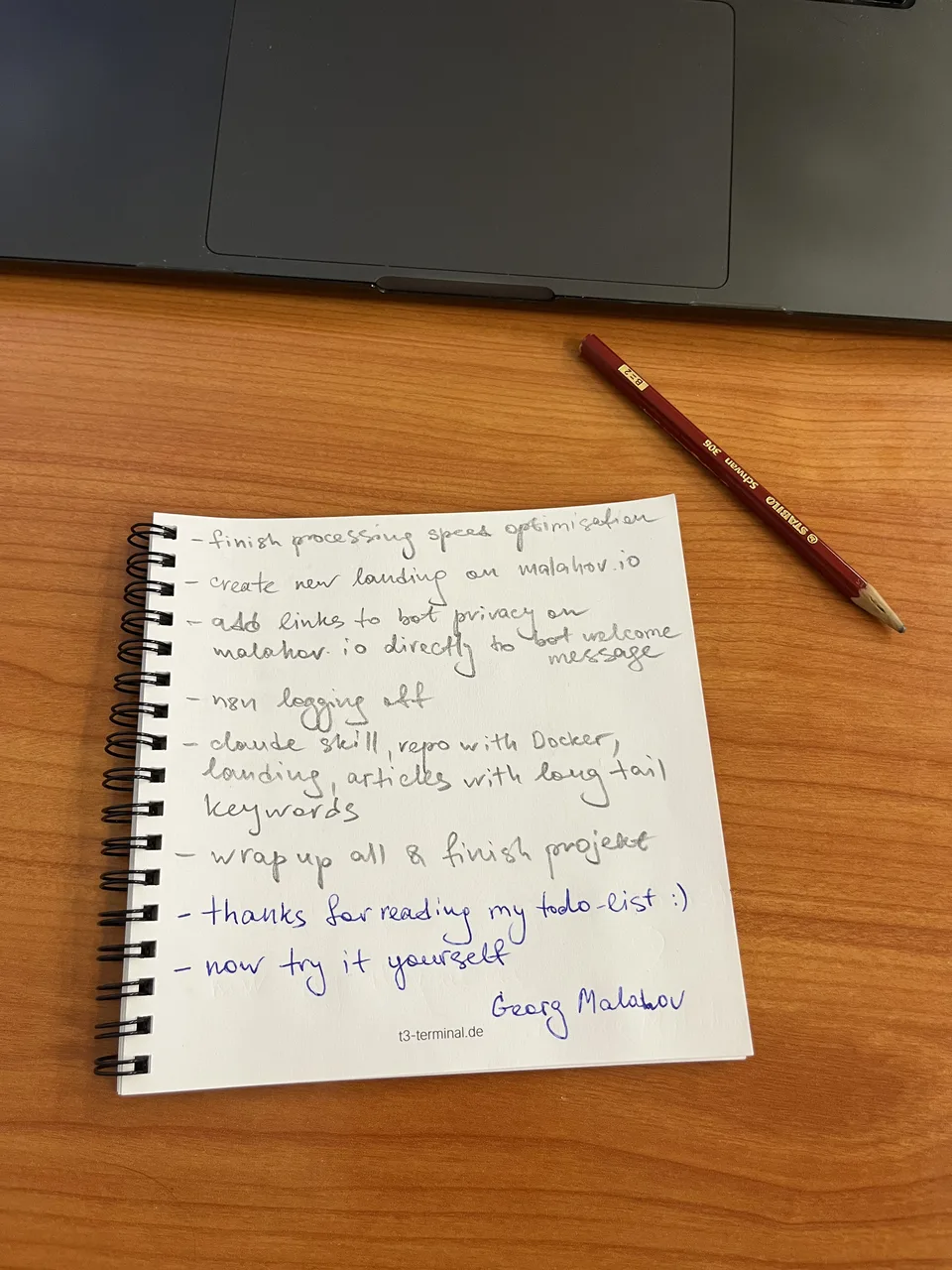
Taken with a phone off the desk: an angle, shadows, the warm cast of the wood, the spiral in the frame. The top of the list in pencil, the last lines and the signature in blue ballpoint.
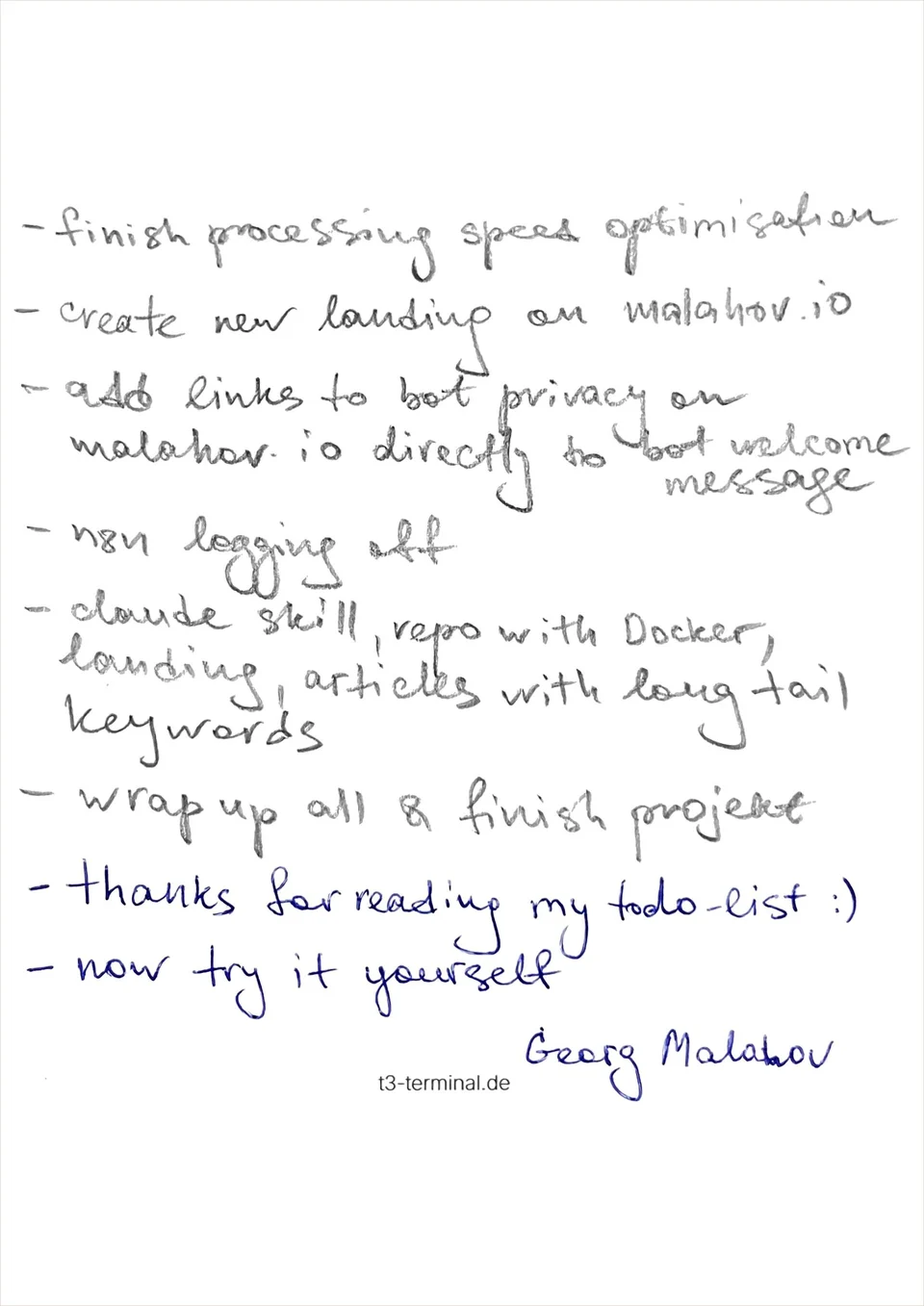
The same thing afterwards: the sheet flat, desk and spiral gone, the paper white. The pencil still grey, the ballpoint still blue.
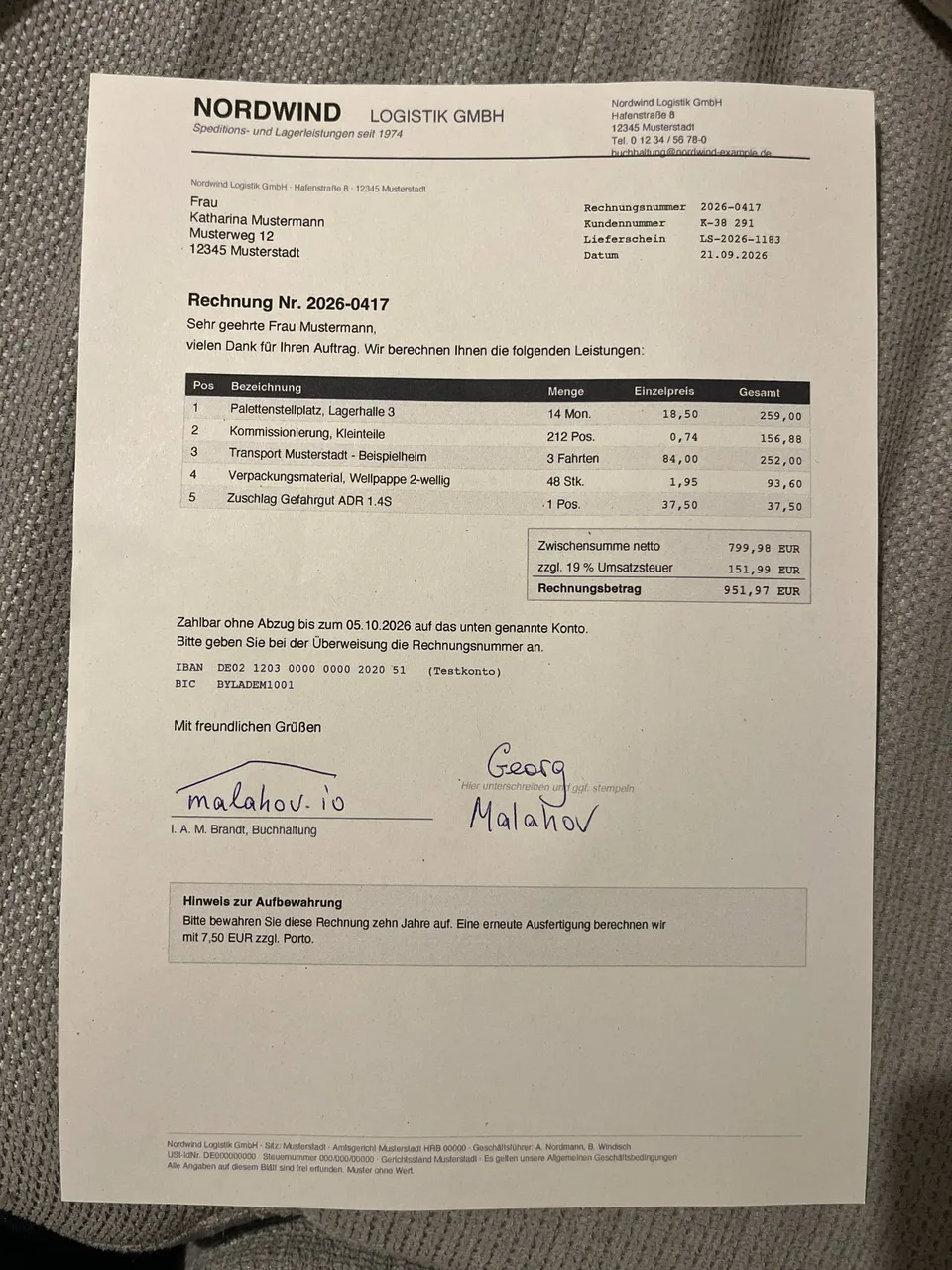
The most ordinary case: a printed invoice shot on the sofa in the evening. Grey fabric all round, a shadow in the corner, the sheet slightly askew, a signature in blue ballpoint. Every detail on the invoice is made up.
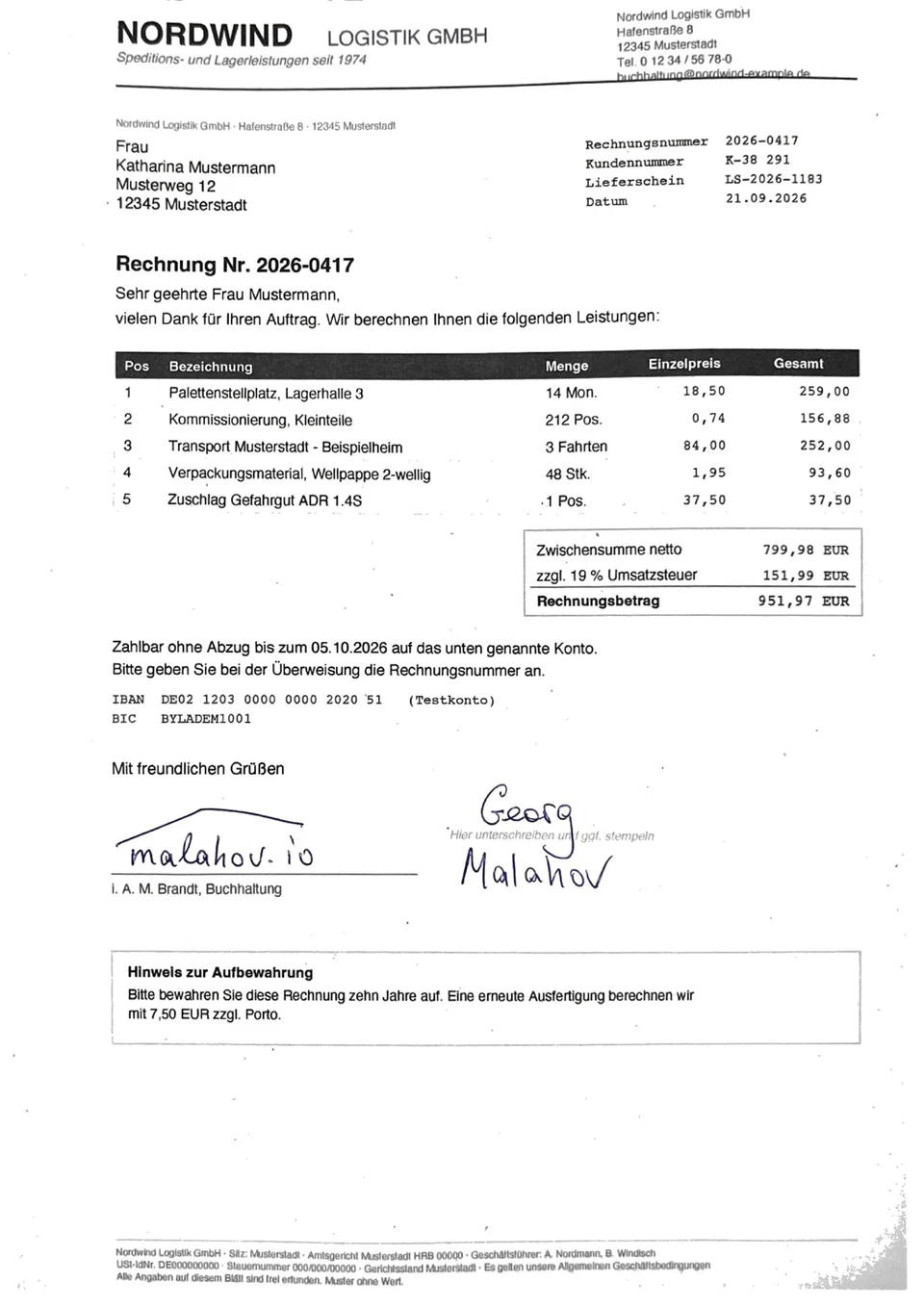
Afterwards: the sheet straight, the paper white, the table readable, the signature blue. You can also see what did not work: in the bottom-right corner, where the shadow was deepest, a trace of the fabric remains.
Try it on whatever is in front of you
Free, no account, nothing to install. One shot tells you whether this is for you.
Open the bot in TelegramIt also
- Builds a multi-page document. Send the pages as one album and one PDF comes back, in the order they went out.
- Tells a document from a snapshot. A frame with no sheet in it gets none of the treatment: the picture is simply fitted onto the page. So the same bot also just turns a handful of snapshots into a PDF.
- Gives the pages back as pictures.
/jpegturns the last PDF back into images — handy when the other side asks for photos. - Speaks three languages. Russian, German and English, following your Telegram client.
- Works without Telegram at all. It is an ordinary container:
docker runwith a folder, and the PDF is built on your own machine, offline. - Lives inside Claude Code too. There is a skill — Claude takes your shots and builds the PDF without leaving the terminal. It sits with the other skills.
Privacy
- Shots are not kept. The n8n log stores no data for any run, successful or failed — set deliberately, because other people's documents pass through this bot.
- Processing on its own server. Not in a cloud, not through somebody else's API. The internal service is not exposed to the internet at all.
- No cloud in the processing. The ordinary image carries neither OpenCV nor NumPy nor any model — plain Python and ImageMagick. The second has a local, offline model that ships inside the container itself. Your shot is processed on that server and never leaves it. It reaches the server through Telegram, like any message there.
- One reference stays. The bot remembers the identifier of your last finished PDF for a week, purely so
/jpegworks. The file itself sits in your own Telegram chat, like any other message. - Counts without names. The bot records how many pages it processed, how long that took and which link brought you — and, if you leave one yourself, your rating or feedback. No names, no usernames, no document content.
- The code is open. MIT licensed, all on GitHub — read it, or run it yourself.
- The legally precise version is in the privacy policy, section 12: what Telegram passes along, the legal bases, and how to have your data deleted.
Questions
What does it cost?
Nothing. No payment, no quota, no account — and it is not a promotion. The work runs on one small server that still copes on its own and costs next to nothing. If it ever stops coping I will say so plainly, rather than quietly putting up a payment form.
How long does it take?
About half a minute per page. An album of eight shots takes a few minutes: pages are processed one at a time so that one user cannot take the whole server.
How do I get the best quality?
Easiest: switch on HD in the send dialog. Otherwise Telegram compresses the picture hard enough to lose detail before processing even starts. For no loss at all, send the shot as a file — the paperclip, then "File" — which is a couple of taps more.
And try to get the whole sheet into the frame: its real size is read from its edges.
What if the document is not A4?
The page will be A4 anyway — that is the format upload forms ask for. A wide document lands on a landscape page: the PAGE turns, not the content, so the text stays readable.
Will the text be recognised?
No. a4norm produces an image of the page, not a text layer. Searchable content is a different job.
How is this different from scanner apps?
They have to be installed, many want an account, and some send the shot to a cloud and show you ads. Here there is no install, no account and no cloud — and the code can be read.
Can I run it myself?
Yes, and that is the primary form:
docker run --rm -v "$PWD:/work" ghcr.io/georg-malahov/a4norm:latest \
  -o /work/document.pdf /work/page1.jpg /work/page2.jpg
It is about a 40 MB download, about 105 MB once unpacked, and it never touches the network. Both images live in the GitHub registry; the Dockerfiles are in the repository.
Can I drive it from Claude Code?
Yes — there is a skill for it: Claude recognises a request like "make a scan of this" and runs the same code. All the skills are here.
Why are there two images?
latest is the tool itself: about 105 MB on disk, plain Python and ImageMagick, no models. full is the same plus one segmentation model, which runs only when the sheet cannot be found by brightness — a white page on a pale desk, say. It is bigger, and most people never need it.
The bot runs full as a safety net for the awkward shots. The before/after on this page comes out identical in latest: the sheet was found by brightness and the model was never consulted.